Public IPs and Internet Accessibility
Assign, remove, and manage public IP addresses to make virtual machines accessible over the internet.
This guide explains how to manage public IP addresses in Hyperstack to make virtual machines (VMs) accessible over the internet. It introduces the role of public and private IPs in cloud networking and walks through key operations like assigning, removing, and managing public IPs using both the UI and the Infrahub API..
Overview
Public IP addresses are essential for making virtual machines (VMs) accessible over the internet. Assigning a public IP to a VM allows it to communicate with external networks, facilitating tasks like web hosting, API responses, and remote access via Secure Shell (SSH). These addresses can be allocated dynamically or statically. Dynamic public IP addresses are assigned from a pool and can change when the VM is stopped or deallocated. In contrast, static public IP addresses remain consistent, ensuring reliability for applications needing stable IP configurations, such as those using DNS or specific firewall rules.
Public IP addresses attached to virtual machines are billed hourly; see Billing details for public IP addresses.
Private IP Addresses
Private IP addresses are confined to the internal network of a Virtual Private Cloud (VPC) or virtual network. These addresses enable internal communication between resources within the cloud infrastructure without being exposed to the public internet, ideal for backend services like databases that do not require direct internet access. Private IP addresses persist for the duration of the VM’s lifecycle within the VPC.
Assigning and Managing Public IPs
When deploying a VM on Hyperstack, you can choose whether to assign a public IP address. If selected, the VM automatically receives a public IP, making it accessible from the internet and allowing remote access via SSH. Public IP addresses can also be attached to existing VMs, managed through the Infrahub API or within the Hyperstack platform. These tools offer user-friendly interfaces for managing cloud resources, making it straightforward to allocate and configure IP addresses as needed.
Public IP Behavior During Hibernation
By default, public IP addresses are released when a VM is hibernated. However, users can choose to retain the public IP during hibernation via the UI or by using the retain_ip=true parameter in the Hibernate Virtual Machine API. If the IP is released, a new (different) public IP will be assigned upon restoration. See Default behavior for public IPs during hibernation for more details.
Managing Public IP Addresses
Deploy a VM With a Public IP Address
How to create a new virtual machine with a public IP assigned, making the VM accessible to the internet.
- Go to the 'Virtual Machines' section.
- Click 'Deploy New Virtual Machine'.
- Enable the 'Assign Public IP' option.
- Click 'Deploy' to create the virtual machine with a public IP address.
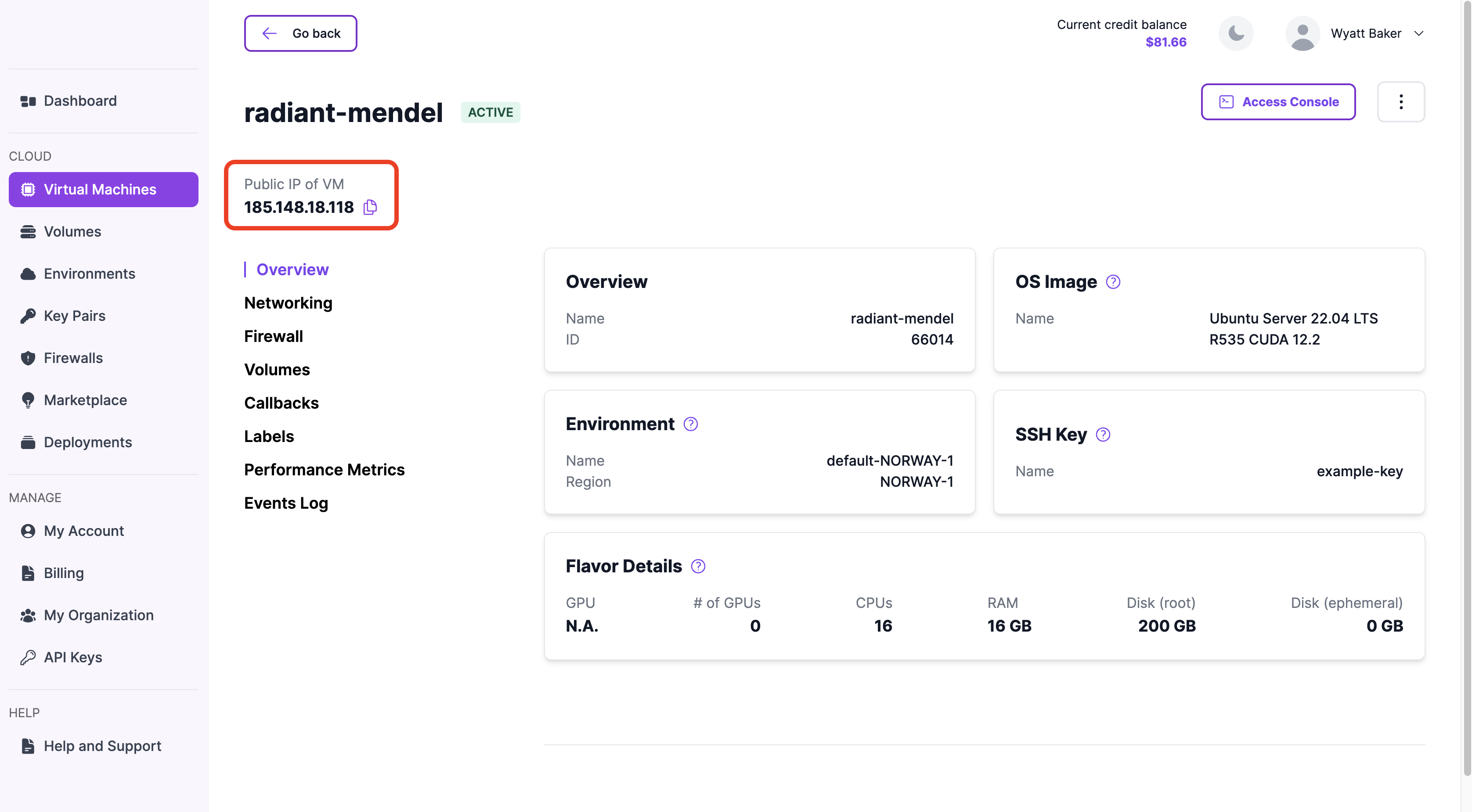
Once the VM has deployed successfully and the public IP has been assigned, it will be displayed on the VM details page as shown below:
Assign a Public IP Address to a VM
How to assign a public IP address to an existing virtual machine.
- Navigate to the 'Virtual Machines' page in Hyperstack.
- Click on the name of the virtual machine (VM) you wish to manage to open its VM Details page.
- Click the Networking tab.
- Under the Public Access section, toggle the Public IP option to assign a public IP address to the VM.
Remove a Public IP Address From a VM
How to remove a public IP address from an existing virtual machine, making it inaccessible to the internet.
- Navigate to the 'Virtual Machines' page in Hyperstack.
- Click on the name of the virtual machine (VM) you wish to manage to open its VM Details page.
- Click the Networking tab.
- Under the Public Access section, toggle the Public IP option to remove the public IP address from the VM.
Public IP address ranges
Public IP addresses are allocated from the ranges below, grouped by region. If a virtual machine connects to an external service that restricts access by source address, allow the ranges for every region you deploy in.
An address stays attached until you release it. Hibernating without retaining the public IP, removing the address, and deleting the virtual machine each return it to the pool. You then receive a different address from that region's ranges.
| Region | Public IP address ranges |
|---|---|
| CANADA-1 | 38.80.122.0/2438.80.123.0/2438.128.232.0/2438.128.233.0/2462.169.158.0/2462.169.159.0/2469.19.136.0/2469.19.137.0/2469.19.140.0/24185.216.20.0/24185.216.21.0/24185.216.22.0/24 |
| NORWAY-1 | 69.19.139.128/2594.101.98.0/24149.36.0.0/23 |
| US-1 | 185.216.23.0/24198.145.126.0/26 |
The same ranges are available as JSON at /public-ip-ranges.json.
Ranges are added and withdrawn as network capacity changes. Check this page for the current list rather than relying on a stored copy.
Kubernetes worker nodes carry no public IP of their own, so their outbound traffic leaves through a different address. To retrieve it, see Whitelisting worker node IP addresses.
Public IP APIs
Infrahub APIs for managing the assignment of public IP addresses to virtual machines.
| Endpoint Name | URL | Description |
|---|---|---|
| Attach public IP to virtual machine | POST/core/virtual-machines/{id}/attach-floatingip | Attaches a public IP address to a virtual machine. |
| Detach public IP from virtual machine | POST/core/virtual-machines/{id}/detach-floatingip | Removes a public IP address from a virtual machine. |