Claude Code
Integrate Claude Code with AI Studio through a local proxy server.
This quickstart guide shows you how to integrate Claude Code with Hyperstack AI Studio using a lightweight proxy server. You’ll learn how to authenticate with AI Studio, route Claude requests through a local proxy, and configure Claude Router to connect to your model. This setup enables Claude Code to interact with any model in the AI Studio catalog using the expected Claude message format.
For the complete guide that includes setup theory, proxy architecture, and advanced testing workflows, see Integrating Claude Code with Hyperstack AI Studio.
Why Integrate Claude Code with Hyperstack AI Studio
Claude Code is a multi-agent, conversational coding environment that supports intelligent code generation, planning, debugging, and reasoning. It allows developers to offload entire coding tasks to AI agents instead of relying on simple autocomplete suggestions.
Hyperstack AI Studio is a fully managed LLM platform that provides scalable model inference and OpenAI-compatible APIs. This makes it a powerful backend for Claude Code, letting you pick the model that fits your development needs.
Claude Code expects model responses in a specific nested message format. Integrating it with Hyperstack AI Studio requires a lightweight proxy that adapts the model output into the expected format.
To learn how to integrate Claude Code with AI Studio end-to-end, see the quickstart tutorial below, or view the full guide: Integrating Claude Code with Hyperstack AI Studio.
How to Install and Connect Claude Code to Hyperstack AI Studio
Follow these steps to install Claude Code, set up a proxy, and connect it to Hyperstack AI Studio. For deeper background and architecture, see the Claude Code full integration guide.
-
Get API Credentials from Hyperstack AI Studio
Generate the necessary credentials to authenticate with Hyperstack AI Studio.
- Log in to the Hyperstack Console
- Navigate to the AI Studio Playground and select your desired model (e.g.,
openai/gpt-oss-20b) - Select the API tab to retrieve your Base URL and Model ID
- Visit the API Keys page and create a new key
- Copy and securely store the generated API key
-
Create a Proxy Server
Claude Code requires responses in a nested format. Build a small proxy server to adapt Hyperstack AI Studio’s responses.
For details on how the proxy works, click here.
View Express.js Proxy Code
javascriptimport express from "express";
import fetch from "node-fetch";
const app = express();
app.use(express.json({ limit: "2mb" }));
const HYPERSTACK_API_KEY = process.env.HYPERSTACK_API_KEY || "YOUR_API_KEY";
const HYPERSTACK_URL = "https://console.hyperstack.cloud/ai/api/v1/chat/completions";
function normalizeMessages(messages) {
if (!Array.isArray(messages)) return [];
return messages.map((msg) => {
if (Array.isArray(msg.content)) {
const flattened = msg.content.map((c) => (c?.text || "")).join("\n");
return { role: msg.role || "user", content: flattened };
}
if (typeof msg.content === "object" && msg.content.text) {
return { role: msg.role || "user", content: msg.content.text };
}
return msg;
});
}
app.post("/chat/completions", async (req, res) => {
try {
const body = { ...req.body };
body.messages = normalizeMessages(body.messages || []);
const response = await fetch(HYPERSTACK_URL, {
method: "POST",
headers: {
Authorization: `Bearer ${HYPERSTACK_API_KEY}`,
"Content-Type": "application/json",
},
body: JSON.stringify(body),
});
let data;
const text = await response.text();
try { data = JSON.parse(text); } catch { data = { raw: text }; }
res.status(response.status).json(data);
} catch (err) {
console.error("Proxy error:", err);
res.status(500).json({ error: err?.message || "Internal server error" });
}
});
const PORT = process.env.PORT || 5001;
app.listen(PORT, () => {
console.log(`Hyperstack proxy running at http://127.0.0.1:${PORT}/chat/completions`);
}); -
Install Claude CLI Tools
Install Claude Code and the Claude Router:
terminalnpm install -g @anthropic-ai/claude-code
npm install -g @musistudio/claude-code-router -
Configure Claude Router
Run the configuration UI to register your proxy with Claude Router.
terminalccr ui-
Open http://127.0.0.1:3456/ui to launch the Claude Router dashboard.
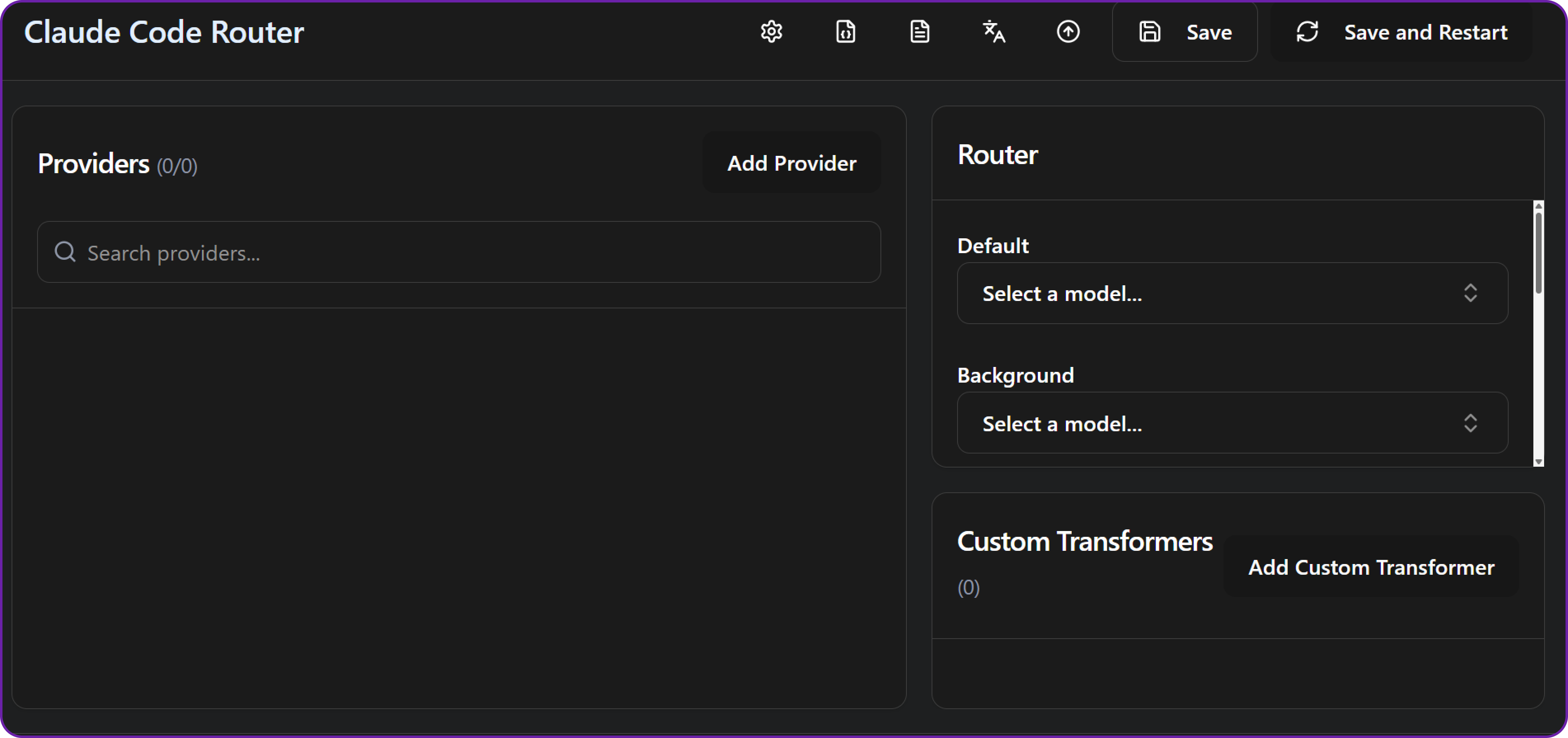
-
Add a new provider with the following details:
- Base URL:
http://127.0.0.1:5001/chat/completions(because our proxy is running locally on port 5001.) - API Key: the one you generated from Hyperstack AI Studio
- Model: e.g.,
openai/gpt-oss-20b, you can choose any model from the AI Studio catalog.
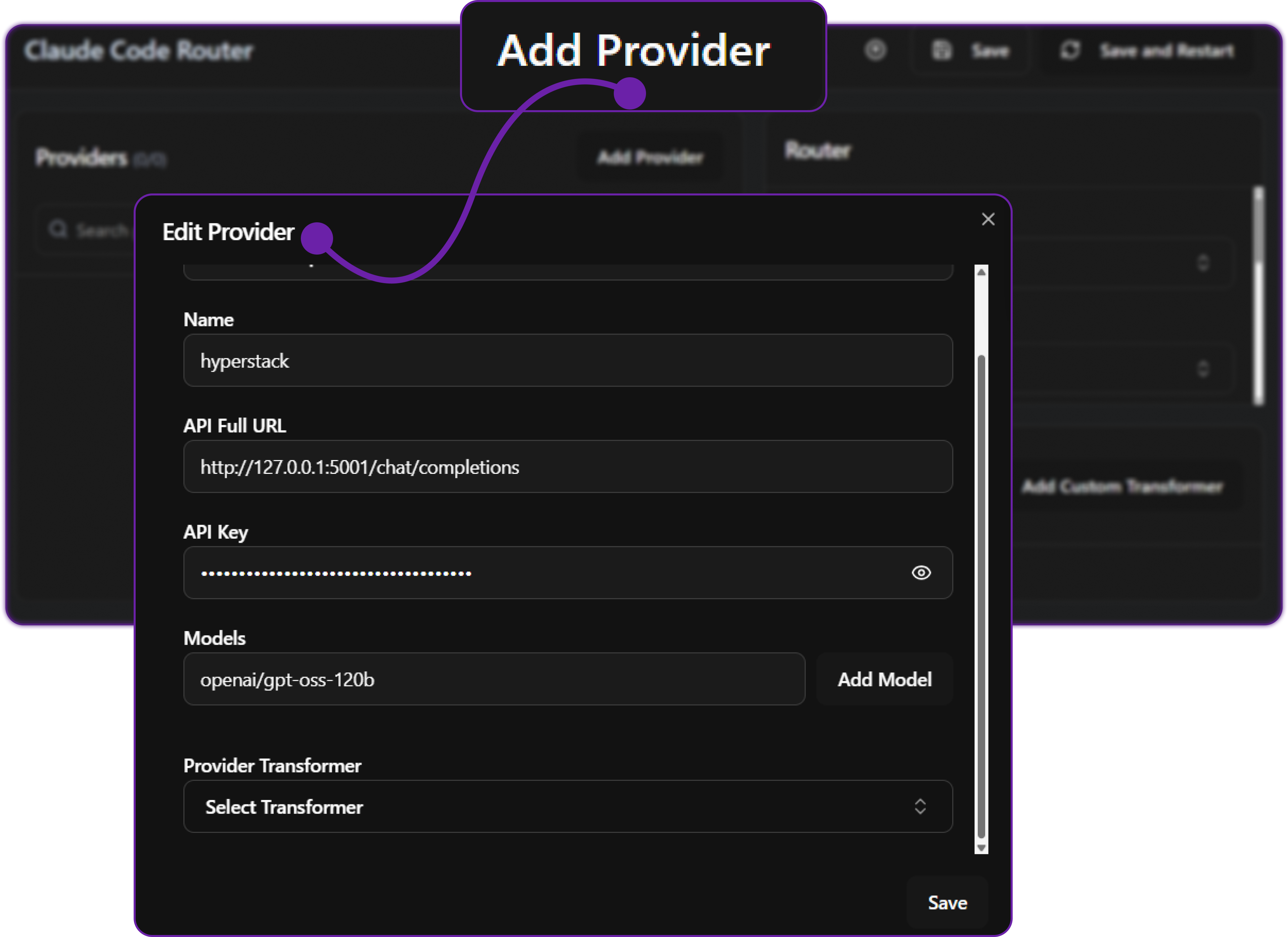
-
-
Run and Test
Start the proxy server and Claude Code to verify the integration:
terminalnode hyperstack-proxy.js
ccr codeTry sending a prompt like
Generate a Python class for user authenticationand confirm the response is returned from your AI Studio model.Next StepsFor troubleshooting and additional configuration options, see the full guide: Integrating Claude Code with Hyperstack AI Studio.