Hibernation
How virtual machine hibernation works, which resources are deallocated, and how it affects billing.
This guide explains the concept of virtual machine hibernation in Hyperstack, including how it works, which resources are deallocated, and how billing is affected. It also provides step-by-step instructions on how to hibernate a VM using the Hyperstack UI and API, along with important notes and cautions about hibernation behavior and billing implications.
Virtual Machine Hibernation Overview
Virtual machine hibernation allows you to preserve the current state of a virtual machine (VM) by saving it to disk for later restoration. When a VM is hibernated, its configuration and root disk data are saved, enabling quick resumption without a full boot-up sequence. Additionally, resources such as CPUs, GPUs, memory, and ephemeral storage are deallocated from the VM. Billing for these deallocated resources is paused until the VM is restored. By default, public IPs are also released, but you can choose to retain them if needed; see the Default Behavior for Public IPs section for details.
This functionality is especially useful when you want to retain a VM for future use without incurring costs for idle resources. By optimizing resource utilization, hibernation ensures you pay only for what you need, reducing overall costs.
Default Behavior for Public IPs During Hibernation
By default, for on-demand (pre-paid) users, any attached public IP address will be released when the VM is hibernated. To retain the public IP during hibernation:
- In the UI, enable the "Keep Public IP attached? option in the hibernation modal.
- When using the Hibernate Virtual Machine API, use the
retain_ipquery parameter set totrue.
If the public IP is released, a new (different) public IP will be assigned upon restoration.
Click below for details about IP retention policies for premium and postpaid account types:
IP Retention for Premium/Postpaid Accounts
Users with postpaid or premium postpaid account types who manage their own IP subnets are manually enrolled by the Hyperstack team into a policy that ensures public IP addresses remain attached during hibernation. This guarantees uninterrupted IP continuity for enterprise workloads.
For these users:
- In the UI, the "Keep Public IP attached?" option is not shown in the hibernation modal, as public IPs are retained by default during hibernation.
- The
retain_ipfield in the Hibernate VM API is ignored, and public IPs will always remain attached during hibernation.
If you have any questions about Public IP behavior for your organization, please contact support.
Restoration and Hardware Availability
If you choose to hibernate your VM, be aware that its hardware resources are not reserved during hibernation. This includes the selected Flavor, which defines the combination of GPU, CPU, RAM, and system disk your VM uses.
Restoring a hibernated VM depends on the availability of the same flavor configuration at the time of restoration. If the required resources are unavailable, you will not be able to restore the VM until the selected flavor is back in stock.
For real-time GPU stock data, use the Retrieve GPU Stock API.
If you are a member of an organization rather than its owner, your user role must include billing permissions in addition to virtual machine permissions before you can restore a VM. See Virtual Machine Permissions for Organization Members.
Billing During Hibernation
During hibernation, billing continues for the root disk data saved to persistent storage and for any public IP address that remains attached. Any attached Shared Storage Volumes also continue to be billed — see Attached Volumes During Hibernation below. For the full breakdown, see Hibernated VMs and Billing.
Attached Volumes During Hibernation
Any Shared Storage Volumes (SSVs) attached to a VM enter the RESERVED state when the VM is hibernated. The volume's data is preserved and it continues to be billed at the standard SSV rate. When the VM is restored, the volume returns to IN-USE and remains attached.
If you intend to use the attached volume independently while the VM is hibernated, detach it before hibernating. Once a volume is RESERVED, the ways to free it are to restore the VM and detach, contact support, or delete the volume. Restoring the VM depends on its flavor being in stock at that time, as covered in Restoration and Hardware Availability. Until the flavor is available, the volume stays RESERVED. See Detaching a Volume and Reserved Volumes.
Hibernation Due to Insufficient Account Balance
If your account balance falls below $0, all active VMs will be immediately transitioned into a hibernated state. However, if a VM is provisioned with a flavor that does not support hibernation, the VM will be permanently deleted instead.
In addition, any public IP address attached to a VM that is hibernated due to insufficient balance will be automatically released. Restoring your account balance to a non-negative value does not automatically reattach the previous IP. Instead, you can manually attach a new (different) public IP address to the VM after restoration.
Hibernating a Virtual Machine Using the UI
In Hyperstack, you can hibernate a virtual machine by following these steps:
-
Select the VM
Go to the Virtual Machines page and click on the VM you want to hibernate to view its details.
-
Open the hibernation modal
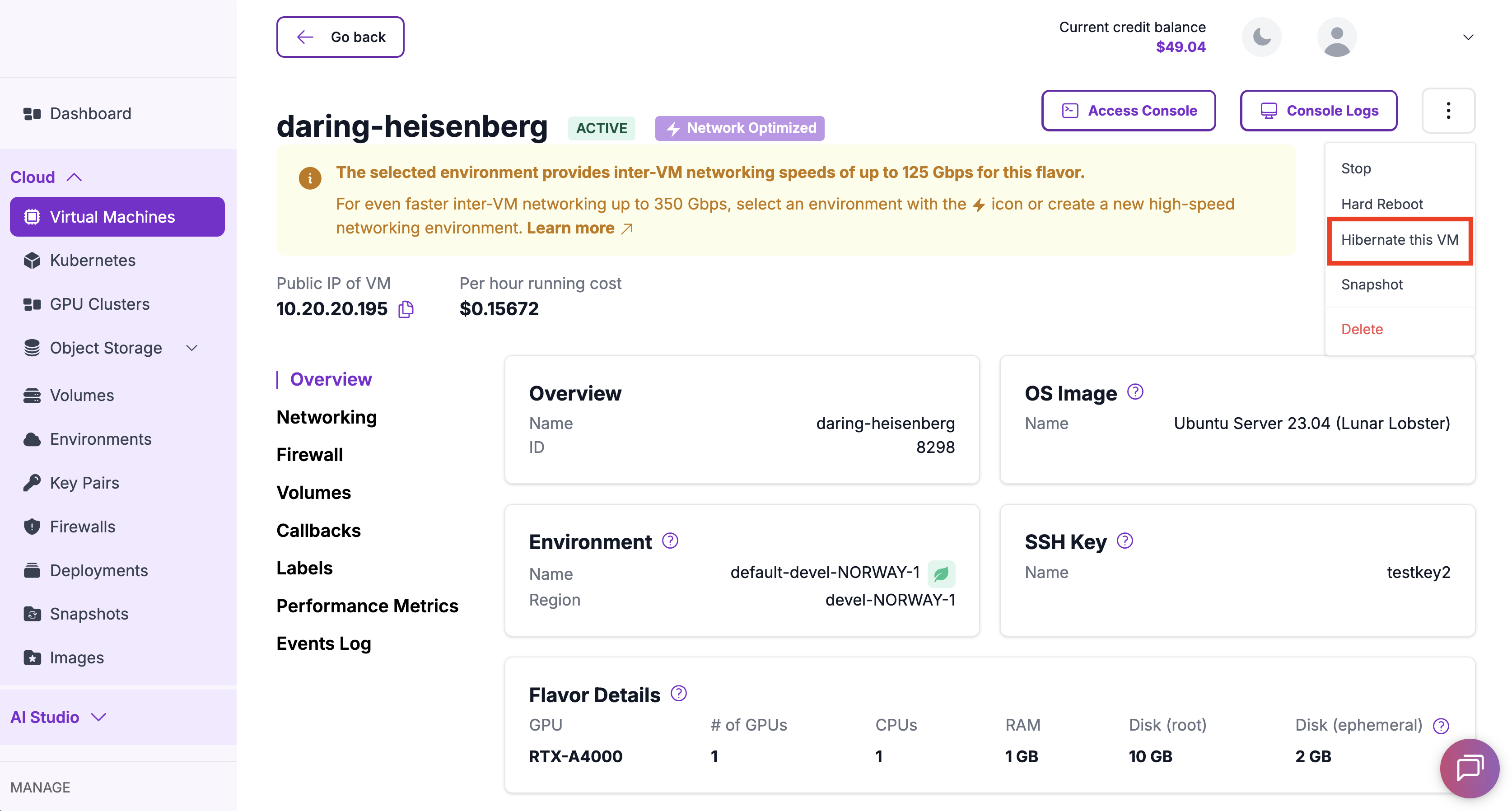
On the VM details page, hover over the "⋮" menu in the top-right corner to reveal additional actions. Click Hibernate this VM to open the hibernation modal.
-
Configure public IP retention and confirm
If the VM currently has a public IP attached, you will see the "Keep Public IP attached?" toggle in the modal. Enable this option to retain the public IP during hibernation for a small additional hourly charge.
Default Public IP BehaviorThis option is disabled by default. If not enabled, the public IP will be released.
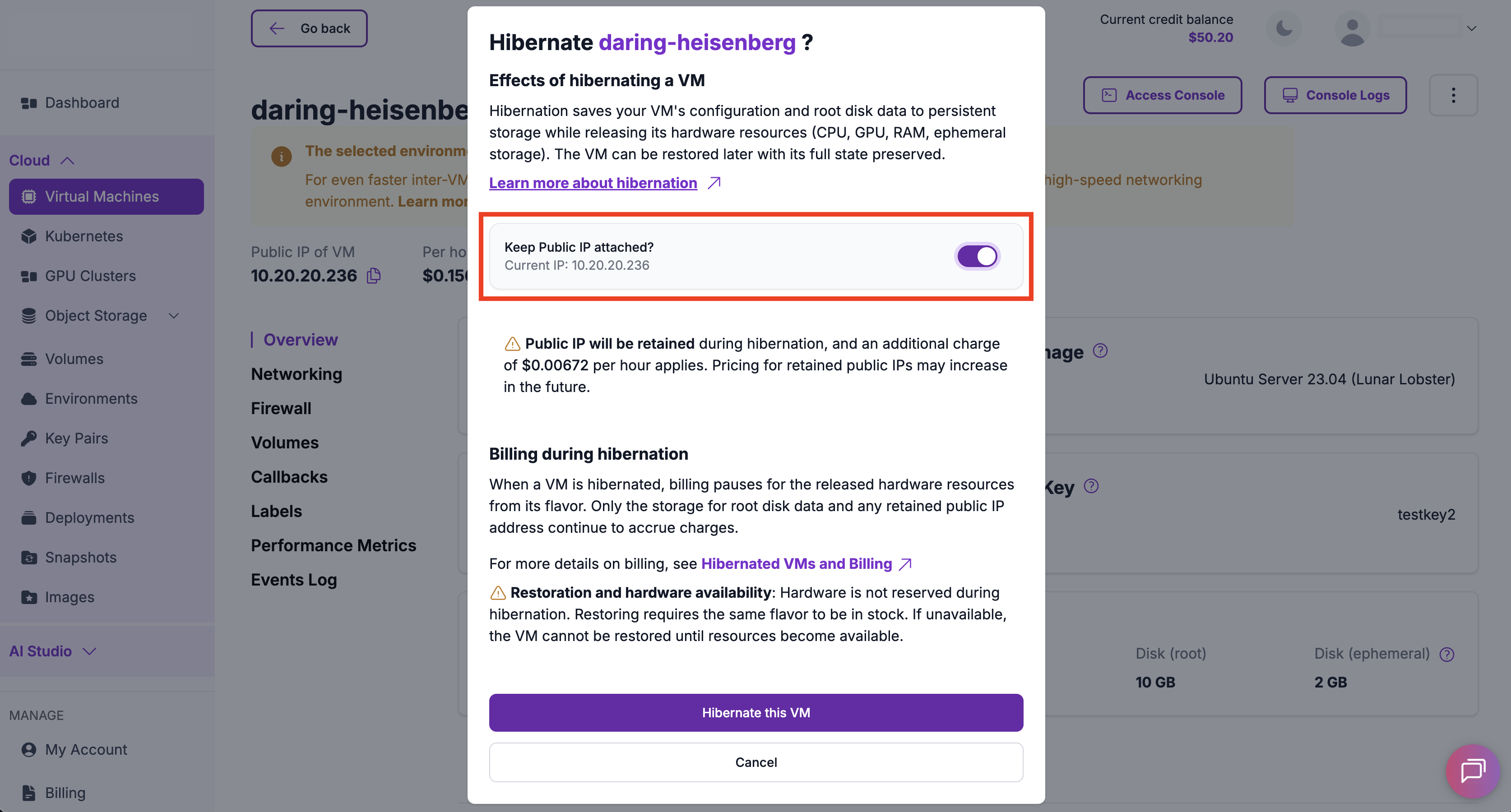
Click Hibernate this VM to confirm and begin the hibernation process. The VM will enter the
HIBERNATINGstate.
The time required to hibernate a VM can vary depending on its configuration and the amount of data.
While in the HIBERNATING state, no additional state changes can be made until the process is complete.
Hibernating a Virtual Machine Using the API
You can hibernate a virtual machine by calling the Hibernate Virtual Machine endpoint in the Hyperstack API.
When hibernating a VM via the API, the attached public IP address will be released by default unless you explicitly include the retain_ip=true query parameter in your request. For details, refer to the Hibernate Virtual Machine API documentation.